
If you applied for an Australia visa from Bangladesh, waiting for news is the hardest part. You keep checking your email. You keep wondering if your visa is approved, still processing, or stuck.
The good news is that Australia gives you a free, official way to check your visa status online — and yes, your passport number is a key part of that check (paired with your date of birth and a reference number, as we’ll explain below).
In this Australia Visa Check By Passport Number Form Bangladesh guide, we’ll walk you through:
- Exactly how to check your Australia visa status using your passport number
- What other details you need before you start
- What to do if the system shows no result
- How to avoid common mistakes that confuse most Bangladeshi applicants
This is written in plain language — no confusing government jargon, just clear steps you can follow right now.
Why You Cannot Check an Australia Visa With Only a Passport Number
Let’s clear up the most common misunderstanding first. A lot of people search “Australia visa check by passport number” hoping they can type in just their passport number and instantly see their result, similar to some other countries’ visa portals. Australia’s system does not work that way, and there is a good reason for it.
The Australian Department of Home Affairs uses a system called VEVO, short for Visa Entitlement Verification Online. VEVO allows visa holders, employers, education providers and other organisations to check visa conditions for free, at any time, from anywhere in the world. But to protect your personal information, VEVO never lets a random person check a visa using only a passport number. You need to combine your passport number with at least one more identifier, usually your date of birth plus one of the following: Park & Co Lawyers
- Transaction Reference Number (TRN)
- Visa Grant Number or Evidence Number
- VEVO password (if one was set)
This two-factor approach stops strangers from pulling up your private visa information just by guessing your passport number. So while your passport is a required part of the check, it is not the only thing you need.
What You Need Before You Start the Check
Before you open the VEVO page, gather these details. Having everything ready saves you from restarting the process halfway through.
- Passport number – exactly as it appears on your passport’s biodata page.
- Date of birth – in the format the system requests.
- One reference number, which could be:
- The TRN (Transaction Reference Number) you received after submitting your application through ImmiAccount, or
- The Visa Grant Number, which appears on your visa grant notification once a decision is made, or
- A password you may have created earlier in VEVO for repeat checks.
- Passport issuing country, which for most readers here will be Bangladesh.
If you applied through a visa agent or agency, ask them for your TRN. This number is generated the moment your application is lodged, so you do not need to wait for a decision to use it.
Step-by-Step: How to Check Your Australia Visa Using VEVO
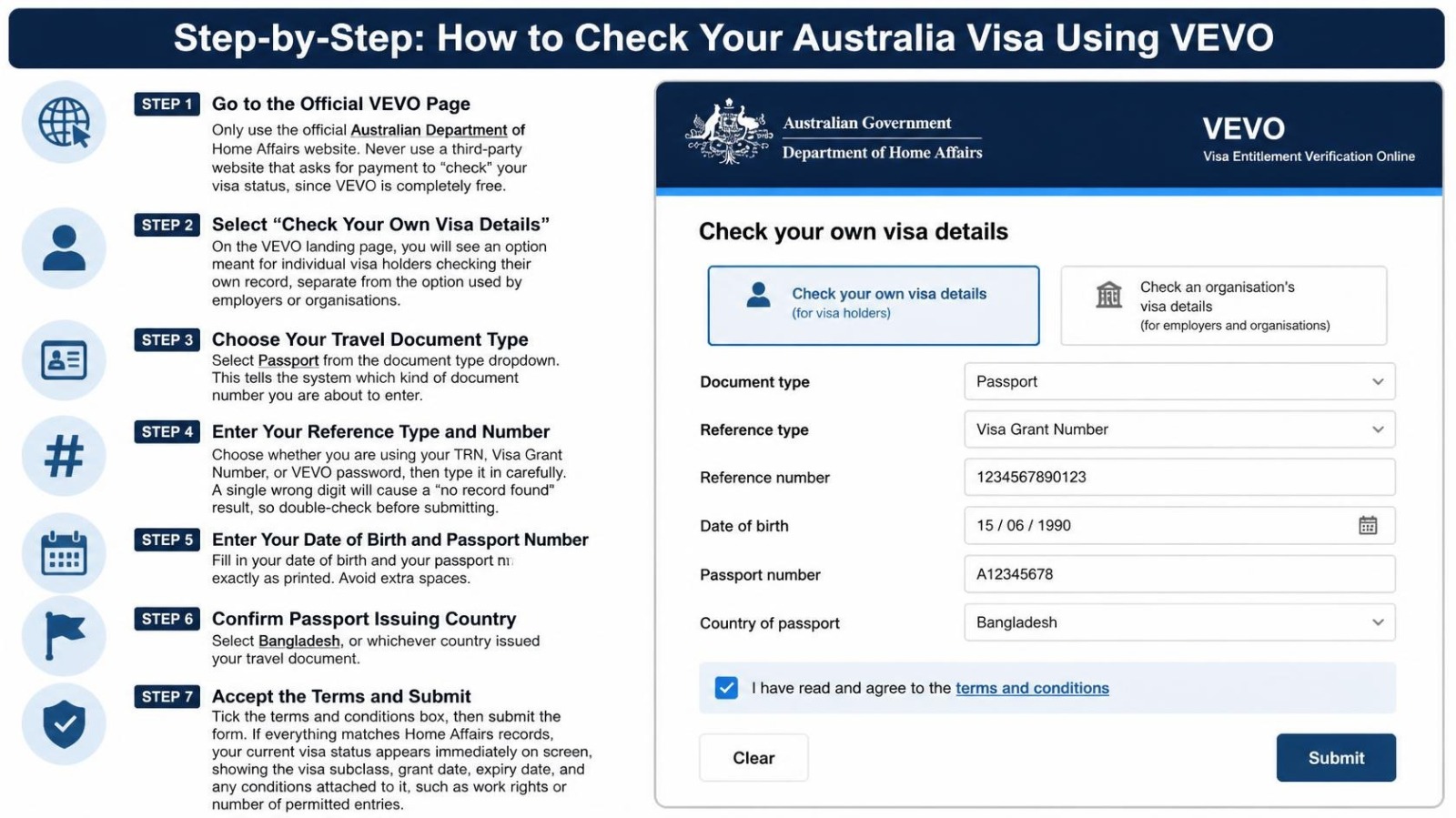
Here is the exact process, broken into simple steps.
Step 1: Go to the Official VEVO Page
Only use the official Australian Department of Home Affairs website. Never use a third-party website that asks for payment to “check” your visa status, since VEVO is completely free.
Step 2: Select “Check Your Own Visa Details”
On the VEVO landing page, you will see an option meant for individual visa holders checking their own record, separate from the option used by employers or organisations.
Step 3: Choose Your Travel Document Type
Select Passport from the document type dropdown. This tells the system which kind of document number you are about to enter.
Step 4: Enter Your Reference Type and Number
Choose whether you are using your TRN, Visa Grant Number, or VEVO password, then type it in carefully. A single wrong digit will cause a “no record found” result, so double-check before submitting.
Step 5: Enter Your Date of Birth and Passport Number
Fill in your date of birth and your passport number exactly as printed. Avoid extra spaces.
Step 6: Confirm Passport Issuing Country
Select Bangladesh, or whichever country issued your travel document.
Step 7: Accept the Terms and Submit
Tick the terms and conditions box, then submit the form. If everything matches Home Affairs records, your current visa status appears immediately on screen, showing the visa subclass, grant date, expiry date, and any conditions attached to it, such as work rights or number of permitted entries.
Using the myVEVO Mobile App Instead
If you prefer checking from your phone, Australia also offers the official myVEVO app, free on both Android and iOS. The first time you use it, you will need the same three things: your Visa Grant Number, date of birth, and passport details. After that, you can set a personal PIN so future checks take just seconds. This app is especially handy if an employer, university, or landlord in Australia asks you to email proof of your visa conditions, since myVEVO lets you send your details directly from the app.
VEVO vs ImmiAccount: What Is the Difference?
Many Bangladeshi applicants confuse these two systems, so here is the simple distinction:
| System | What It Is For |
| ImmiAccount | Where you lodge your visa application, upload documents, and track processing progress before a decision is made |
| VEVO | Where you check the details and conditions of a visa that has already been granted and is currently in effect |
In short, use ImmiAccount while your application is still being processed, and use VEVO once you have a visa grant number to confirm your current status, work rights, and expiry date. Both systems complement each other rather than replace one another.
What If VEVO Shows “No Record Found”?
This is the most common frustration people face. Here are the usual reasons, and how to fix each one.
- Your visa has not been decided yet. VEVO only shows visas that are currently in effect. If your application is still under assessment, there is nothing to show yet. Check ImmiAccount instead for processing updates.
- A typo in your passport number or reference number. Even one wrong character breaks the match. Re-check every digit slowly.
- Your visa is a bridging visa without a separate grant number. Some bridging visa holders need to use their TRN instead of a grant number.
- Your passport was renewed after the visa was granted. If you got a new passport after your visa was issued, and your visa was not “transferred” to the new passport (called a Passport Details Update), VEVO may not recognise the new passport number. In this case, you may need to submit an update request through Home Affairs’s New Passport Details form before it will link correctly.
- Genuine system error or outdated details. Occasionally, VEVO does not reflect very recent changes right away, so give it a little time if you were just notified of a decision.
If none of these apply and you are still stuck, you can use the official VEVO Request for Reference Number Form on the Home Affairs website, or contact the Department directly for manual verification via the VEVO enquiry form.
Avoiding Visa Checking Scams: What Every Bangladeshi Applicant Should Know
Because so many Bangladeshi travellers search for “Australia visa status check” online, some fake websites and Facebook pages have popped up promising to “check your Australia visa fast” for a fee. Please remember:
- VEVO is 100% free, every single time, with no limit on how many checks you can do.
- The only official domain is under the Australian Department of Home Affairs: immi.homeaffairs.gov.au. Never enter your details on a lookalike site.
- No legitimate agency needs your ImmiAccount password to check your status for you — they only need your TRN or grant number.
- Scam agents often apply for free visas to Australia — like transit visas, maritime crew visas, or some visitor visas — but charge people for an expensive “work visa.” Always verify what visa was actually applied for on your behalf by checking your visa grant letter in ImmiAccount. Embassy
If an agency or “consultant” asks for money specifically to “run a VEVO check” for you, that is a red flag. The check itself is free; you would only pay a service fee for help preparing an application in the first place, which is a completely different service.
For a full breakdown of common tricks and how to report them, see the Australian High Commission Dhaka’s official guide: Stay Safe from Visa Scams.
Tips Before You Even Apply, So Checking Later Is Easy
A smooth visa check later starts with an organised application now. A few habits will save you a lot of stress:
- Save your TRN the moment you submit your application. Screenshot it, write it down, or store it in your phone notes.
- Keep your ImmiAccount login safe and accessible, since it’s where your TRN, visa grant letter, and all decision notifications live.
- Use one consistent passport throughout the process. If you must renew your passport mid-process, inform Home Affairs immediately using the New Passport Details form so records stay linked.
- Double-check every character on your application form against your passport, since even a single mismatched letter can create verification headaches later.
How Travel Next BD Can Help
Checking your own visa status is simple once you know the steps, but applying correctly in the first place is where most delays and rejections actually happen. This is where working with an experienced visa consultancy makes a real difference.
Travel Next BD is a Bangladesh-based, technology-driven visa service provider that handles the entire process for you, from choosing the right visa subclass, preparing a complete and accurate document set, to keeping you updated at every stage so you are never left guessing about your TRN, your application status, or your next step. If you have already applied and are unsure how to read your VEVO result, or if you are just starting your Australia visa journey from Bangladesh, our team can guide you end to end.
You can reach out through our visa consultancy service for a free initial consultation, document review, and honest advice on your chances before you spend a single taka on the wrong application.
What Your VEVO Result Actually Tells You
Once your check goes through, do not just glance at it and close the tab. The result page holds details you will need again and again, so it is worth reading properly.
- Visa subclass number, such as 600 for Visitor visa, which tells you exactly what category you hold.
- Grant date and expiry date, so you know your travel window.
- Entry conditions, whether it is single entry or multiple entry, and how many days you may stay per visit.
- Work and study rights, since some visitor visas carry an “8101 No Work” condition, while others allow limited work.
- Current location field, showing whether Home Affairs has you recorded as inside or outside Australia, which matters for certain visa actions.
Save a screenshot or download the result where possible. Airlines occasionally ask to see proof of visa conditions before boarding, and having this ready avoids last-minute stress at the airport in Dhaka.
Frequently Asked Questions
- Can I check my Australia visa status using only my passport number?
No. Passport number alone is not enough. You also need your date of birth and either your TRN, Visa Grant Number, or VEVO password. - Is VEVO free to use?Yes, completely free, with no limit on how many times you check.
- How long after my visa is granted will VEVO show it?
Usually within hours, though occasionally it can take up to a day to reflect fully. - What if I lost my TRN?
Log back into your ImmiAccount, since your TRN is listed against every application you have lodged. If you applied through an agent, ask them for it. - Can an employer in Australia check my visa without my permission?
Yes, employers are legally required to use VEVO to confirm work rights, but they need your passport and reference details from you to do it, so nothing appears without your involvement. - Does VEVO show visas that have already expired or previous visas I held?No. <cite index=”9-1″>A VEVO visa check provides current visa status, visa grant date, visa expiry date, current location, visa subclass number, study rights, work entitlements, and travel conditions</cite>, but it does not show historical or future visa records, only what is currently in effect.
- I am applying through Travel Next BD. Do I still need to check VEVO myself?
You are welcome to check anytime for peace of mind, but our team also monitors your application status and will inform you the moment there is an update, so you are never left refreshing a page alone.